
User Management
Это содержимое пока не доступно на вашем языке.
The Users page allows you to manage accounts that can access the Alta web interface. You can create new users, edit existing ones, and assign roles to control their permissions.
Managing Users
Section titled “Managing Users”The main page displays a list of all configured users with the following details and controls:

- Name: The username for the account.
- Role: The permission level assigned to the user (e.g.,
admin). - Enable Toggle: A switch to quickly enable or disable a user account without deleting it.
- Edit: Opens a dialog to modify the user’s details.
- Delete: Permanently removes the user account.
Create or Edit a User
Section titled “Create or Edit a User”Clicking the Create button or the edit icon opens a dialog where you can configure a user account.
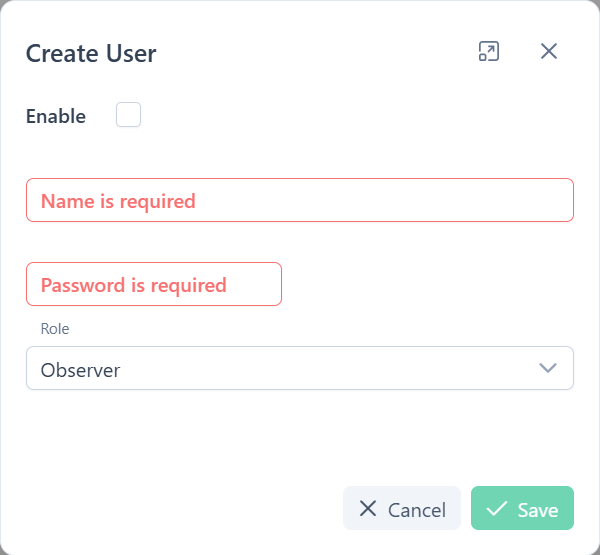
- Enable: Check this box to activate the user account.
- Name: The username for logging in. This field is required.
- Password: The password for the account. This field is required when creating a new user.
- Role: Defines the user’s permissions. Select a role from the dropdown list (e.g.,
Admin).