
Dashboard in Cesbo Alta
Esta página aún no está disponible en tu idioma.
The Dashboard provides a real-time overview of all configured Channels and Receivers, showing key metrics for system monitoring:
- Stream Bitrates
- Active User Counts
- Storage Usage (if enabled)
Each Channel/Receiver is shown as a card with a color-coded border indicating its status.

Card Status Indicators
Section titled “Card Status Indicators”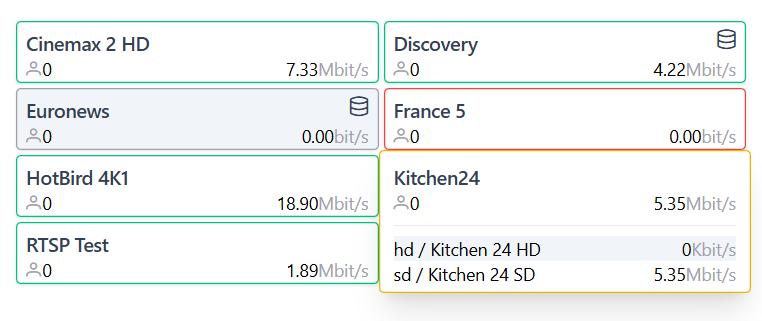
- Green Border: Enabled and streaming normally.
- Gray Border: Disabled or no stream.
- Yellow Border: One or more stream variants inactive.
Card Header Contents
Section titled “Card Header Contents”- Name: Identifier for Channel/Receiver
- 🗄️ icon: Archive enabled on this channel
- ⚙️ icon: Opens Channel settings
<Variant>/<Channel>: Opens Edit Receiver dialog
- User Count: Number of active stream viewers
- Bitrate: Real-time bitrate in Mbit/s
- Clicking a card expands it to show more details.
Expanded Card Details
Section titled “Expanded Card Details”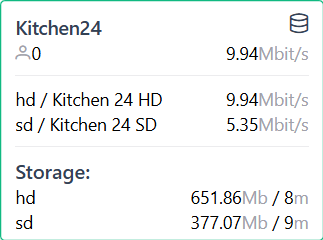
Stream Details
Section titled “Stream Details”- Variants List: e.g.,
HD / SD,Receiver A / Receiver B - Individual Bitrates: Shown per resolution/variant
Storage Usage (if enabled)
Section titled “Storage Usage (if enabled)”- Lists variants with:
- Data Size
- Time Frame for stored content
Usage Tips
Section titled “Usage Tips”- Search & Sort via Navigation Bar to find Channels/Receivers
- Monitor:
- Bitrate and user count for performance
- Troubleshooting:
- Gray card: Check if stream is enabled and receiving input
- Yellow card: Check variant statuses in settings