
Export M3U8 Playlist
The “Export m3u file” feature allows you to generate and download an M3U8 playlist containing your configured channels. This playlist file can be used with third-party media players (like VLC or IPTV players) or other systems that support M3U playlist imports.
How to Export a Playlist
Section titled “How to Export a Playlist”On the “Export m3u file” page, you can customize and download your channel list.
Page Options
Section titled “Page Options”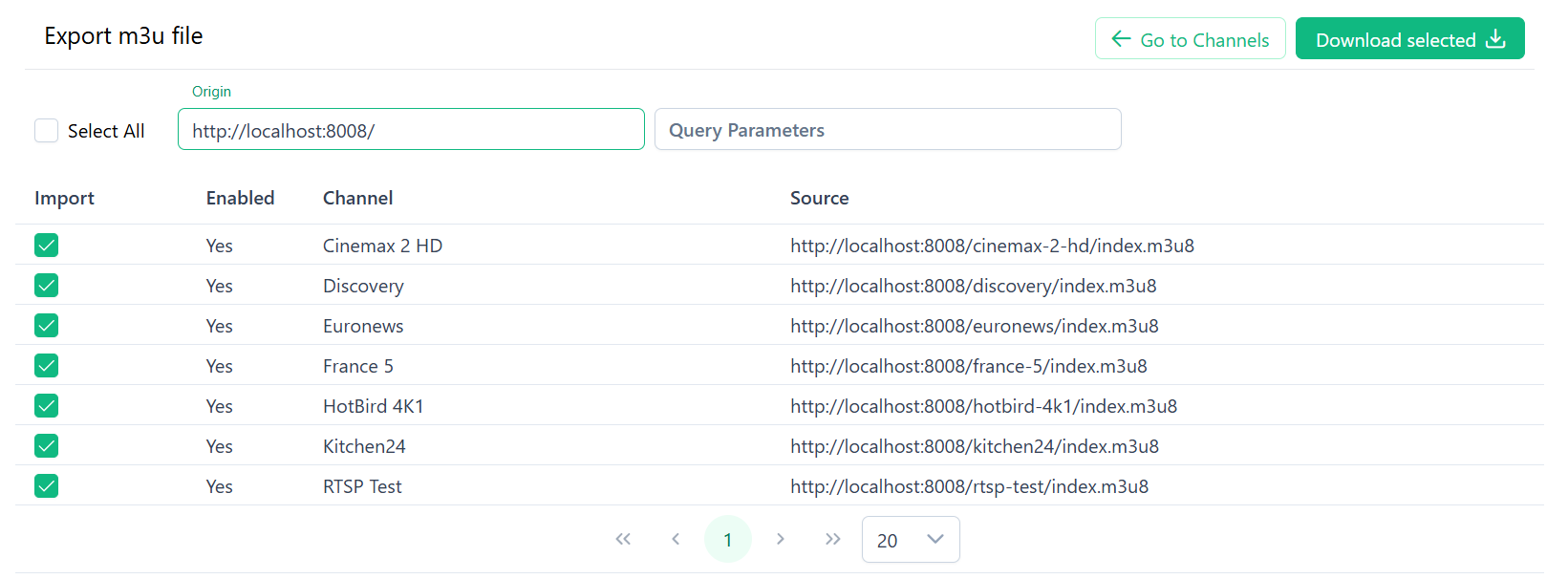
- Origin: This field sets the base URL for all streams in the exported playlist. It is automatically filled from the Server name field in your HTTP OTT Server settings. If the Server name is empty, Alta uses the server’s current address. You can change this URL here if your streams are accessed through a different public address, like a CDN or a reverse proxy.
- Query Parameters: Use this to add extra URL parameters, such as authentication tokens, to every channel link in the playlist.
- Channel List: A table of all available channels.
- Use the checkboxes to select which channels to include in the export. You can use the Select All checkbox to include every channel.
- The table shows the channel’s name, its enabled status, and the final source URL that will be added to the playlist.
- Download selected: After selecting your channels, click this button to download the
.m3u8playlist file to your computer. - Go to Channels: This button navigates you back to the main Channels page.